
Published – February 6 Last Updated: February 6, 2026
I have spent years studying eye health. One thing I hear almost every day from people who work at computers is this: “My eyes are exhausted by noon, and I don’t know why.” The answer is simple. Your eyes were never designed for hours of fixed-focus screen work.
They need movement, rest, and variety. When they don’t get it, you feel it — burning, blurring, headaches, dryness. The good news? You can do something about it right at your desk. Eye exercises for screen time are free, fast, and proven to help. You don’t need equipment.
You don’t need a gym. You just need a few minutes and the right techniques. In this guide, I’ll walk you through 10 exercises that work, explain the science behind each one, and give you a simple daily routine you can start today.
Why Your Eyes Struggle During Screen Time
Before we get into the exercises, let me explain what’s really happening to your eyes during a long day at a computer.
When you stare at a screen, three things go wrong concurrently.
First, your blink rate drops. Normally, you blink around 15 to 20 times per minute. During screen use, that drops to as low as 5 to 7 times per minute — a reduction of nearly 66%. Fewer blinks mean your tear film dries out faster. That leads to dry, gritty, irritated eyes.
Second, your focusing muscles lock up. The ciliary muscles inside your eye control how your lens bends to focus on near objects. When you stare at a screen all day, these muscles stay contracted for hours without release. It’s like holding a fist clenched all day and then wondering why your hand aches.
Third, your eye movement becomes almost nonexistent. At a computer, your eyes barely move. They track left to right and occasionally scroll. That’s a fraction of the full range of motion your eyes are built for.
The result of all three is what eye doctors call computer vision syndrome — or what most people know as digital eye strain. Studies suggest it affects up to 90% of people who use screens for more than two hours a day.
Screen-induced eye strain isn’t caused by a defect in vision itself. It is a muscle fatigue problem — and muscles recover with the right movement and rest.”
This is exactly why eye exercises for screen time are so effective. They directly target muscle tension, poor circulation, and reduced blinking — the three root causes of digital eye fatigue.
Eye Exercises for Screen Time — 10 Techniques That Work
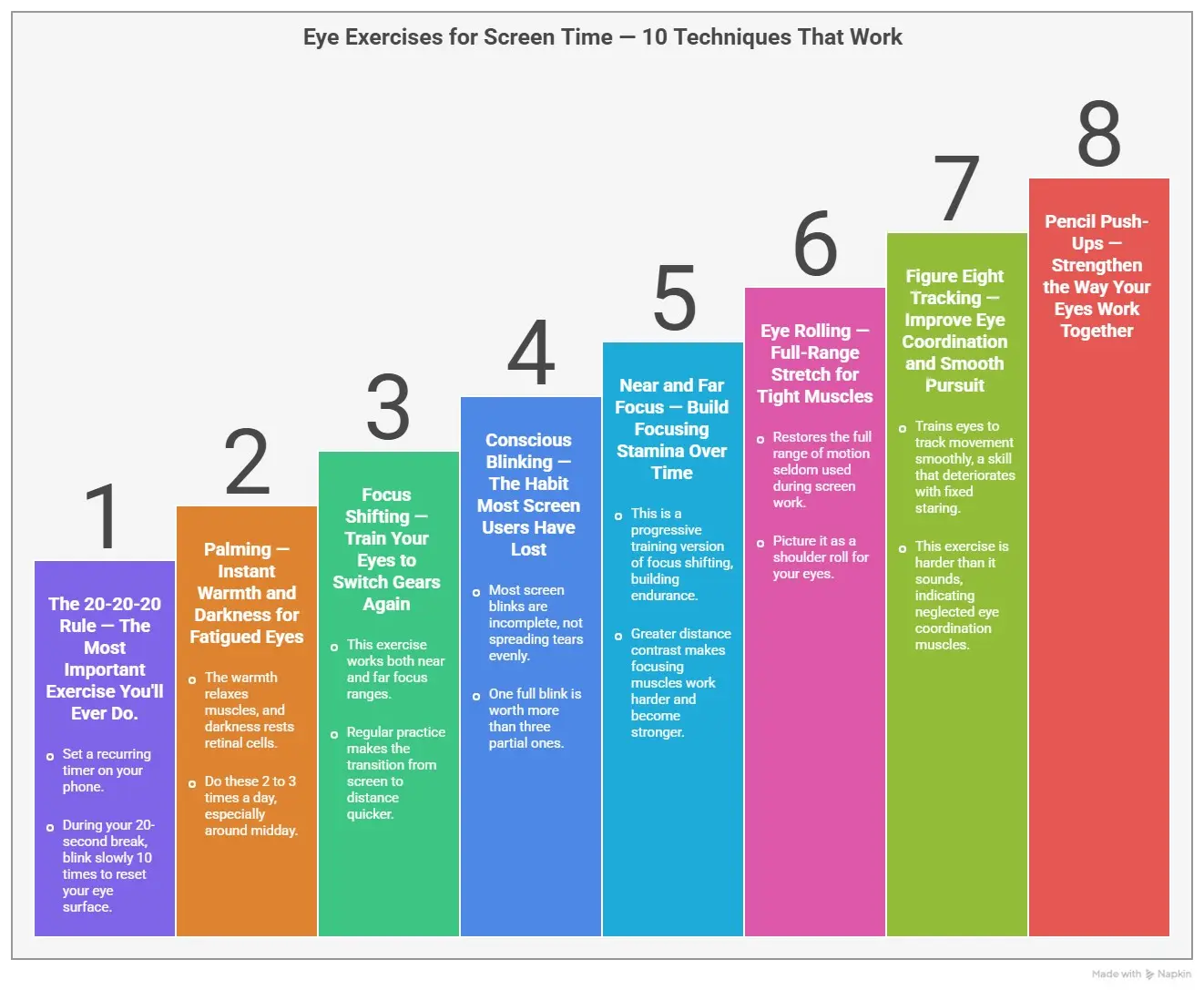
These exercises are organized from most important to supplemental. If you’re short on time, do the first three every day. If you can build the full routine, it will be even better.
1. The 20-20-20 Rule — The Most Important Exercise You’ll Ever Do.
Every 20 minutes, shift your gaze to an object about 20 feet away and focus on it for 20 seconds.
That is the complete exercise. It sounds almost too simple to matter — but it’s the single most evidence-backed habit a screen user can build.
Here’s why it works. Distant viewing forces your ciliary muscles to fully relax. They cannot stay contracted when your eyes are focused far away. This 20-second break gives them the release they desperately need. Over a full workday, dozens of these micro-breaks add up to a massive reduction in accumulated muscle fatigue.
How to make it stick – Set a recurring timer on your phone. Don’t try to remember on your own — you won’t. Apps like “Eye Care 20 20 20” exist specifically for this. During your 20-second break, blink slowly 10 times to reset your eye surface.
2. Palming — Instant Warmth and Darkness for Fatigued Eyes
Palming is the fastest way to reset your eyes midday, and it feels incredible when your eyes are already exhausted.
Rub your palms together vigorously for about 20 seconds until they feel warm. Then close your eyes and gently cup your palms over them. Don’t press on your eyeballs — just create a warm, dark tent over your closed eyelids. Rest your elbows on your desk. Breathe slowly and deeply. Hold for 30 seconds to 2 minutes.
The warmth from your hands relaxes the muscles around and behind your eyes. The profound darkness gives your light-sensitive retinal cells — which are switched on and working hard all day — a genuine, full rest.
When you open your eyes, most people describe the sensation as a visual reset. Colours look sharper. Text looks cleaner. Do these 2 to 3 times a day, especially around midday when fatigue peaks.
3. Focus Shifting — Train Your Eyes to Switch Gears Again
After hours of near-distance screen work, your eyes get “stuck.” Shifting focus to anything far away feels slow and effortful. That’s your ciliary muscles telling you they need training.
Position your thumb roughly ten inches away from your face. Focus on it for 5 seconds. Then shift your gaze to something 15 to 20 feet away — a picture on the wall, a window, a doorframe — and focus there for 5 seconds. Switch back and forth 10 times.
This exercise works both ends of your focus range. Near and far, in and out, repeatedly. Think of it as a flexibility drill for your eye muscles. With regular practice, that sluggish, blurry transition from screen to distance becomes noticeably quicker and easier.
4. Conscious Blinking — The Habit Most Screen Users Have Lost
Here is something most people don’t realize: most blinks during screen use are incomplete. Your upper eyelid comes partway down but never fully closes. Partial blinks don’t spread tears evenly across your eye surface. That’s why dryness builds even on days when you think you’re blinking normally.
Conscious blinking retains this pattern.
Close your eyes fully. Pause for 2 full seconds. Then open slowly. Repeat 10 times in a row. Do this sequence every hour throughout your workday.
One full, deliberate blink is worth more than three partial ones. This one small habit change — just 30 seconds per hour — can dramatically reduce the dryness and irritation that builds up through a long screen day.
“Your blink is your eye’s windshield wiper. A partial blink leaves streaks. A full blink gives you a clean, empty surface.”
5. Near and Far Focus — Build Focusing Stamina Over Time
This is the progressive training version of focus shifting. Where focus shifting builds flexibility, this one builds endurance.
Hold a finger just 3 inches from your nose. Focus sharply on your fingerprint for 10 full seconds. Then shift to an object across the room — ideally 10 feet or more away — and hold focus there for 10 seconds. Return to your finger. Repeat 5 complete cycles.
As this becomes comfortable over weeks of practice, push the distance of your far target further. Look out a window at something a block away. The greater the distance contrast, the harder your focusing muscles work — and the stronger they become.
6. Eye Rolling — Full-Range Stretch for Tight Muscles
Your eye muscles have a full range of motion that they seldom use during screen work. Eye rolling restores that range.
Keep your head completely still. Look slowly upward. Then trace a wide, smooth circle — up, right, down, left — going clockwise. Complete 10 slow, full circles. Then reverse and trace 10 counterclockwise circles. Blink several times when finished and let your eyes rest.
Smooth is the keyword. Slow and smooth. Fast or jerky movements do nothing useful and may cause discomfort. Picture it as a shoulder roll — gentle, deliberate, covering the full arc.
7. Figure Eight Tracking — Improve Eye Coordination and Smooth Pursuit
This exercise trains your eyes to track movement smoothly — a skill that deteriorates quickly with too much fixed-screen staring.
Imagine a colossal figure eight lying on its side (an infinity symbol) on the floor about 10 feet in front of you. Trace the shape slowly with your eyes, following the continuous loop. Complete 10 full traces in one direction, then reverse for 10 more.
Keep your head still. Only your eyes move. This is harder than it sounds at first, which tells you exactly how much your eye coordination muscles have been neglected.
8. Pencil Push-Ups — Strengthen the Way Your Eyes Work Together
Both of your eyes need to converge — point at the same spot simultaneously — for comfort near work. When convergence is weak, you get headaches, double vision, and fatigue faster than normal.
Hold a pencil at arm’s length and pick one letter on its side to focus on. Slowly bring it toward your nose while keeping that letter sharp and single in your vision. The moment it doubles or blurs, it stops. Slowly move the pencil back out. Repeat 10 times.
If you find yourself reaching this “double point” unusually quickly, your convergence needs work. Consistent daily practice moves that point progressively closer to your nose over weeks.
9. Eye Massage — Release the Tension You’ve Been Carrying All Day
The muscles around your eyes — your temples, brow ridge, and the area just below your eye socket — accumulate tension quietly throughout the day. You rarely notice it until it becomes a headache.
Close your eyes. Use your fingertips to make small, slow circles on your temples for 30 seconds. Move to the bony ridge just beneath your eyebrows — gentle circular pressure for another 30 seconds. Finally, with very light fingertip pressure, work the soft area below your eyes for 30 seconds.
Be gentle. This area is sensitive. The goal is circulation and relaxation, not deep tissue work.
10. Distance Gazing — The Perfect Way to End Your Screen Day
Find a window. Step outside if you can. Look at the farthest point visible to you — a rooftop, a hill, a tree line on the horizon. Let your eyes rest there for 2 to 3 full minutes. Don’t strain. Don’t try to make out the details. Just gaze softly and blink naturally.
Distance gazing is the only exercise on this list that asks nothing active of your eye muscles. It is pure, passive rest for your focusing system. I do this every day before I close my laptop. It is a visual full stop at the end of the work session — and it makes a noticeable difference to how my eyes feel the next morning.
Your Daily Routine for Eye Exercises for Screen Time
Here is a practical schedule that fits into any workday without disrupting it.
Morning — 3 Minutes
Start before you open a single tab or email.
- Palming: 1 minute
- Focus shifting: 1 minute
- Conscious blinking: 30 seconds
This primes your focusing system before the demands of the day begin.
During Work — Ongoing
- Every 20 minutes: 20-20-20 rule (non-negotiable — set a timer)
- Every hour: Conscious blinking sequence (30 seconds)
These two habits alone will account for the largest reduction in daily eye fatigue.
Midday Break — 5 Minutes
- Near and far focus: 2 minutes
- Eye rolling: 1 minute
- Figure eight tracking: 2 minutes
End of Workday — 5 Minutes
- Pencil push-ups: 2 minutes
- Eye massage: 1.5 minutes
- Distance gazing: 2–3 minutes
📌 Important Note – You do not need to do all of it every single day to see results. The 20-20-20 rule, conscious blinking, and palming alone — done consistently — will improve how your eyes feel within 1 to 2 weeks.
What Science Says About Eye Exercises for Screen Time
Research into computer vision syndrome consistently shows that structured movement breaks and targeted exercises reduce strain symptoms by 30 to 40 %. Participants in studies also report improved focusing ability, fewer headaches, and better comfort during extended screen sessions.
These are not miracle results. But they are real and repeatable — provided the exercises are practiced consistently, not just when symptoms are already bad.
Here is what exercises cannot do: they will not correct nearsightedness, astigmatism, or age-related lens changes. They will not replace a proper glasses prescription if you need one. And they will not compensate for a poorly positioned monitor or a workspace with harsh lighting.
For everything that surrounds and supports these exercises — screen positioning, lighting, nutrition for eye health — I recommend reading the complete guide to eye health. It covers the full picture.
Signs You Need More Than Exercises
⚠️ Stop and see an eye doctor if you notice any of the following –
- Blurred vision that does not clear after a full night of rest
- Double vision during or after screen work
- Actual pain in or behind your eye — not tiredness, but pain
- Daily headaches that begin behind your eyes
- Light sensitivity that is getting worse over time
- A feeling that your current glasses or contacts no longer work properly
These symptoms point to issues that exercises cannot resolve on their own. An updated prescription, computer-specific lenses, or professional vision therapy may be the right next step. Don’t wait — symptoms like these tend to worsen when left unaddressed.
Final Thoughts
Your eyes do extraordinary work every single day. They deserve a few minutes of attention in return. The exercises in this guide are not complicated. They do not require special equipment or extra time carved out of a busy schedule. Most of them take under 2 minutes.
The 20-20-20 rule takes 20 seconds. What they require is consistency. Done daily, eye exercises for screen time reduce fatigue, improve comfort, and protect your visual health across a long career at a screen.
Start with one exercise today. Try palming for 60 seconds right now. Set your 20-20-20 timer before you read another email.
Small, consistent steps always beat ambitious routines that never happen. Your eyes will notice the difference.
For more on reducing digital eye strain and building a healthier screen routine, read our full breakdown of digital eye strain causes and relief strategies.
This article is for informational purposes only. It does not replace advice from a qualified eye care professional. If you have concerns about your vision or eye health, please see a doctor.
Reference
Simple Computer Eye Exercises to Reduce Eye Strain
https://www.centreforsight.net/blog/simple-eye-exercises-to-relieve-computer-eye-strain-stress/
6 eye exercises to fight eye strain
https://www.visiondirect.co.uk/eye-health/eye-exercises-fight-eye-strain/
5 Exercises to Alleviate Eye Strain
https://www.optometristsclinic.com/5-exercises-to-alleviate-eye-strain/

Adel Galal is a health and wellness writer with over 30 years of experience studying and writing about health, fitness, nutrition, and healthy living. He is the founder of NextFitLife.com, where he shares practical, evidence-based guidance to support long-term health at any age. Adel’s mission is simple:
to help people make smarter health choices that fit real life, at any age.